
Rideshare Safety Tips: How to Stay Safe in an Uber or Lyft This Holiday Season
Posted by Police Magnum on Nov 16th 2026
Thanksgiving and the holiday stretch are some of the busiest weeks of the year for Uber and Lyft: airport runs, late flights, office parties and nights out with friends. Most rides go exactly as planned, but a few simple habits make every trip safer. These rideshare safety tips walk you through what to do before you request a ride, while you wait, once you're in the car and if something ever feels off, so you can relax and get where you're going.
Before You Request: Set Up Your App's Safety Tools
Both major rideshare apps now include safety features, but many riders never turn them on. Take five minutes at home, not on a dark curb, to set them up.
- Add trusted contacts. Uber's Share My Trip lets you set trusted contacts and reminders to share your trip status in real time, and Lyft's Location Sharing lets trusted contacts follow your ride and location live. (Sources: Uber Safety, Lyft Safety.)
- Turn on PIN verification. Uber's optional Verify Your Ride gives you a 4-digit PIN to tell your driver, and the ride can only start with the correct PIN. Lyft offers a similar PIN Verification option.
- Know where the emergency button is. Uber's Safety Toolkit includes an in-app Emergency Button that calls 911 and shows your live location, vehicle details and license plate so you can share them with the dispatcher. Lyft lets you reach ADT emergency professionals through the app.
- Learn the recording option. Uber lets riders record trip audio in the app, and Lyft offers audio and video ride recording.
Feature names and availability change and can vary by city, so check your own app's safety section for what's offered where you live.
While You Wait: Stay Inside and Stay Aware
The wait is when people tend to drop their guard: standing at the curb, head down, scrolling. A few small changes help:
- Wait indoors when you can. Stay inside the restaurant, office lobby or airport terminal until the app shows your driver arriving.
- Pick a well-lit pickup spot. Choose a busy, visible spot near an entrance instead of a dark side street or the far end of a parking lot.
- Keep your phone in hand, not your attention. Glance at the app, then look up. Knowing who's around you matters more than your playlist.
- Have your keys and essentials ready. Keep your bag zipped and your keychain in your hand, not buried at the bottom of a tote.
Before You Get In: Confirm the Car, the Plate and the Driver
This is the single most important step, and it takes ten seconds. Before you open the door:
- Match the license plate to the plate shown in the app.
- Match the make, model and color of the car.
- Compare the driver's face to the photo in the app.
- Ask "Who are you here to pick up?" instead of saying your own name first. A real driver will have your name.
- Use your PIN if you turned on PIN verification.
If anything doesn't match, don't get in. Cancel, report it in the app and request another ride. A few dollars or a few minutes is never worth the risk.
During the Ride: Small Habits That Add Up
- Sit in the back seat, ideally behind the passenger seat. It gives you personal space and two doors to exit from.
- Buckle up. Collisions are a real rideshare risk too, so make it automatic.
- Follow along on your own map. If the route drifts far from where you're going without a reason, ask about it. Both apps also watch for trips that go unusually off-course, through Uber's RideCheck and Lyft's Smart Trip Check-In.
- Keep personal details to yourself. Friendly small talk is fine, but there's no need to share whether you live alone or when you'll be away for the holidays.
- Stay sharp after a night out. If you've been drinking, ride with a friend when possible and share your trip with someone who is sober.
If Something Feels Wrong
Trust your instincts. You don't need a reason to end a ride that feels unsafe.
- Ask to be let out in a busy, well-lit public place, such as a gas station, store or restaurant, not a dark street.
- Use the in-app tools. Call 911 through the emergency button if you're in danger, or use the app's safety reporting if you're uncomfortable but not in immediate danger.
- Make noise. Calling a friend on speaker, or pulling the ring on a Police Magnum Personal Safety Alarm with its 135 dB siren, draws attention fast.
- Report it afterward, even if nothing happened. Reports help the platforms keep their communities safe.
Carrying Pepper Spray in a Rideshare
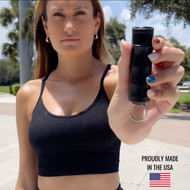
Many riders, especially people heading home late or traveling alone, like having a last-resort option within reach. A compact keychain spray is easy to hold in your hand from the curb to your front door. The Police Magnum Flip Top Pepper Spray Keychain is a 1/2 oz unit made in the USA with our Police-Grade 10% OC formula (1.33% MC), a thumb-activated flip top that helps prevent accidental discharge, and UV identifying dye. If you'd like both a siren and a spray on one key ring, the Safety Alarm & Flip Top Pepper Spray Combo pairs them.
A few responsible-carry reminders:
- It's for self-defense only. Pepper spray is a tool to create distance and get away from a real threat, never something to show off or use in an argument.
- Know how to use it before you need it. Practice getting it out and flipping the top open. Our guide on how to use pepper spray covers the basics.
- Check local laws. Pepper spray is legal in all 50 states, but size, age and carry rules vary by state and city. See our pepper spray laws by state guide and confirm with your local authorities.
- Check where you're headed. Rideshare companies set their own community guidelines, and airports, stadiums and many venues have their own rules. Review the current policies before you go.
- Flying for the holidays? The TSA does not allow pepper spray in carry-on bags (TSA). Read is pepper spray allowed on planes before you pack.
- Don't leave it in a hot car for long periods, and keep an eye on your canister's date. Police Magnum sprays have a 5-year shelf life.
Holiday Rideshare Checklist
- Trusted contacts and PIN verification turned on in your app
- Phone charged (bring a small power bank for long travel days)
- Wait indoors, then confirm plate, car and driver before getting in
- Back seat, seat belt, your own map open
- Keys and personal safety tools in hand, not buried in a bag
- A friend who knows your plans and your ETA
Rideshare Safety FAQ
What's the most important rideshare safety tip?
Confirm the license plate, car and driver photo before you get in, and ask the driver who they're picking up rather than giving your name first. Getting into the wrong car is the risk you can most easily prevent.
Is it safer to sit in the front or back seat of an Uber or Lyft?
The back seat is generally recommended. It gives you more personal space and lets you exit from either side of the car.
How do I share my ride with family or friends?
Uber's Share My Trip and Lyft's Location Sharing let trusted contacts follow your ride in real time. You can set them up in each app's safety settings.
Can I carry pepper spray in an Uber or Lyft?
Pepper spray is legal to carry in all 50 states, subject to state and local rules on size, age and use. Rideshare companies also have their own community guidelines, so review the current policy for the app you use and check your local laws.
What should I do if my driver goes off-route?
Ask about it calmly. If the answer doesn't make sense or you feel unsafe, ask to be let out in a busy public place, use the app's emergency tools or call 911, and report the trip afterward.
Stay safe out there this holiday season. A little preparation lets you enjoy the trip, not worry about it. Browse our full lineup of pepper sprays, made in the USA with Police-Grade OC.